No account. Nothing leaves your phone.
Make sense of the beautiful chaos.
Track every wee, poo, nap and meal in one tap. A private, on-device AI spots the patterns and tells you what to work on next — no account, nothing leaves your phone.
Free · iPhone & iPad · iOS 26 or later
What it does
Everything the first few weeks throw at you.
Fast enough to catch every event mid-clean-up, and calm enough to actually read at 3am.
Quick log
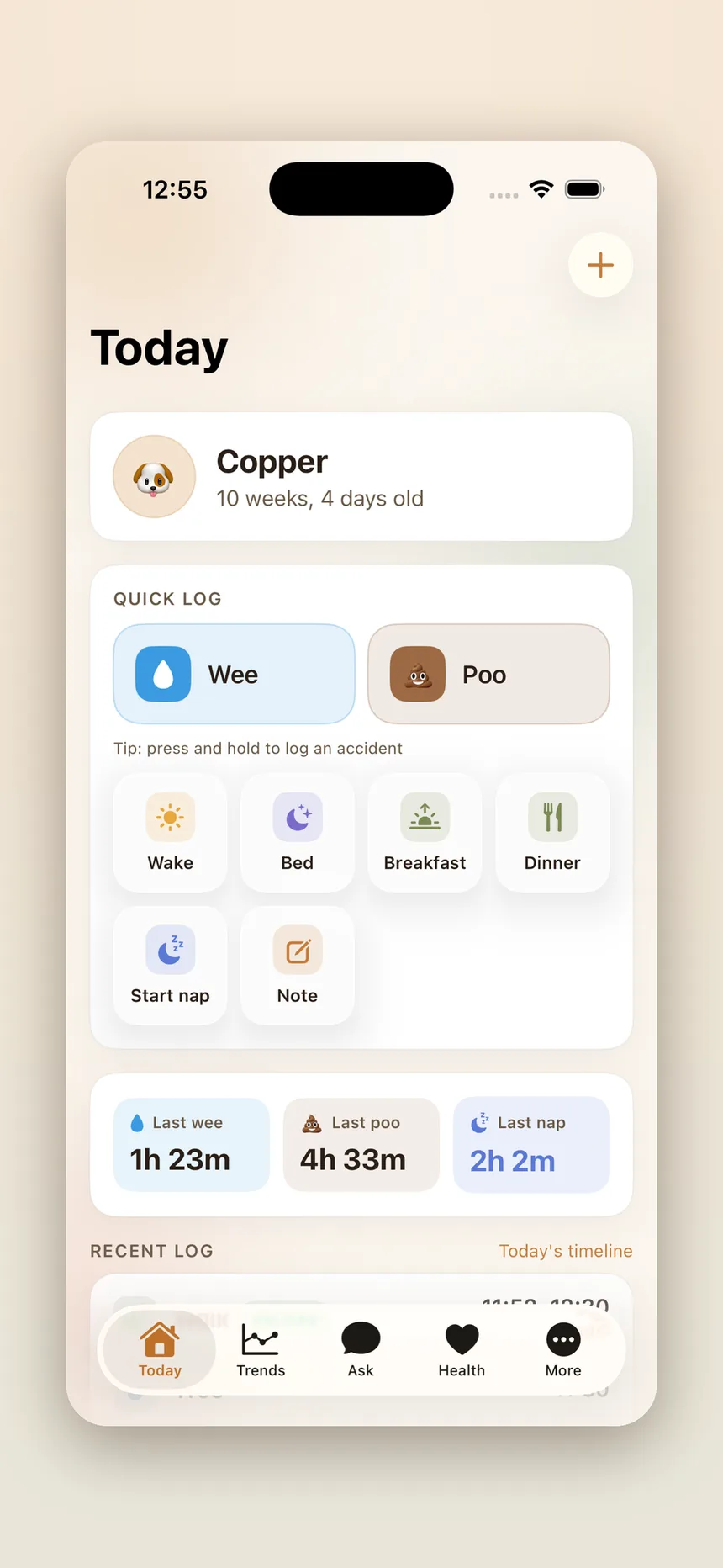
Log it in one tap
Wees, poos, naps and meals — capture every moment the second it happens.
- One-tap tiles for potty, sleep, meals and notes
- Press and hold to mark an accident
- Time since the last wee, poo and nap, always in view
Day at a glance
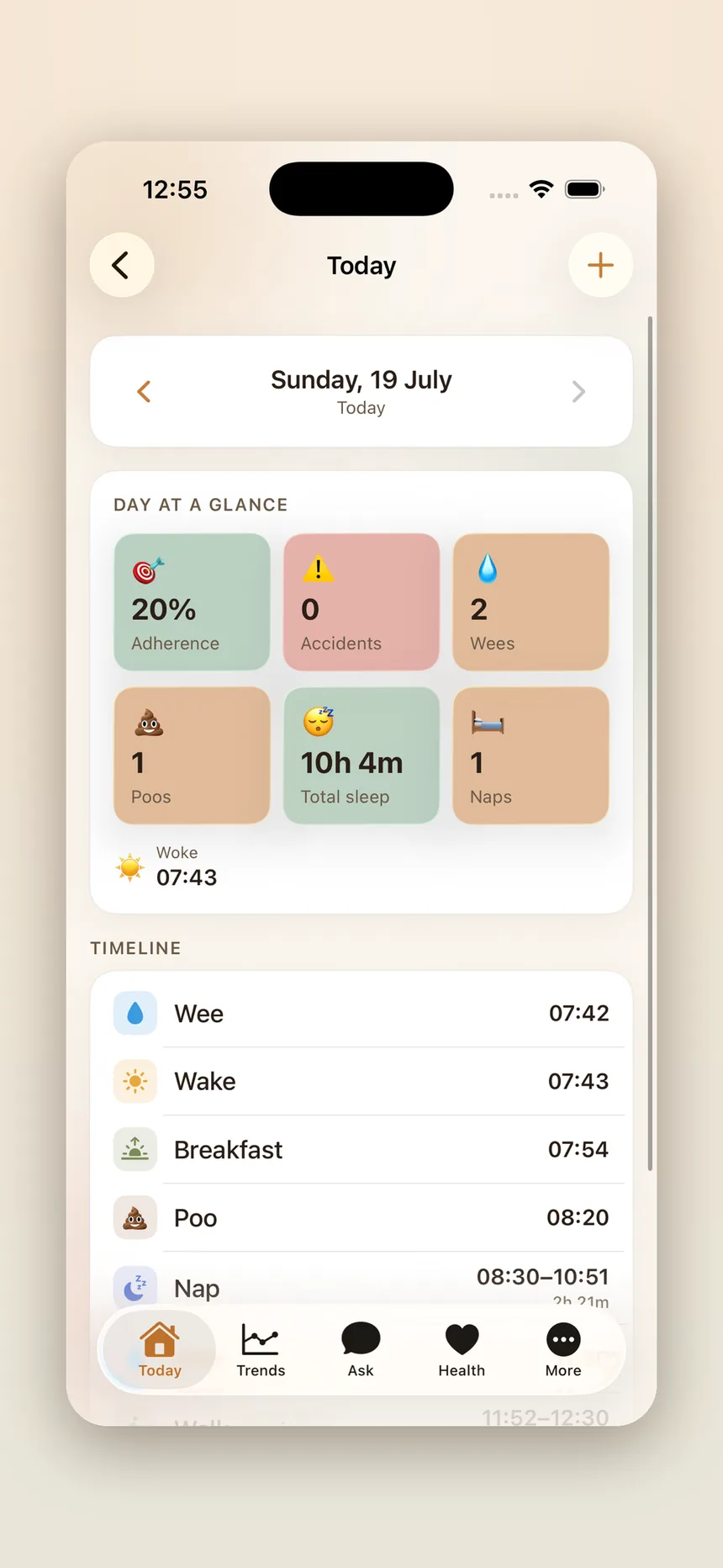
Your whole day at a glance
Adherence, accidents and a full timeline in one calm, clear view.
- Potty-training adherence against your own target schedule
- Accidents, wees, poos, total sleep and naps for the day
- A timeline of everything that happened, and when
Sleep patterns
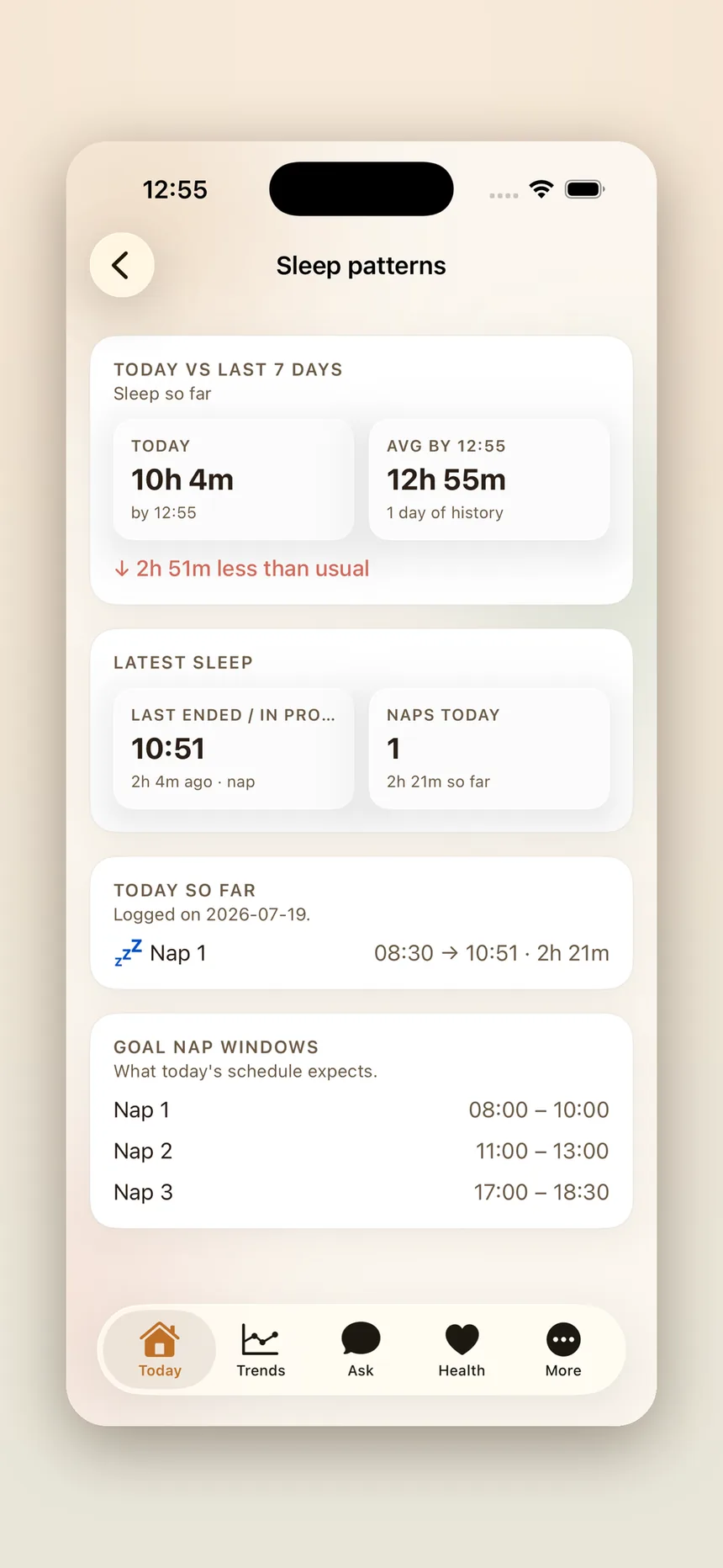
Spot the patterns
See how today's sleep stacks up against the last 7 days, in real time.
- Today's sleep compared against your pup's own recent average
- Naps so far, including one still in progress
- Goal nap windows showing what today's schedule expects
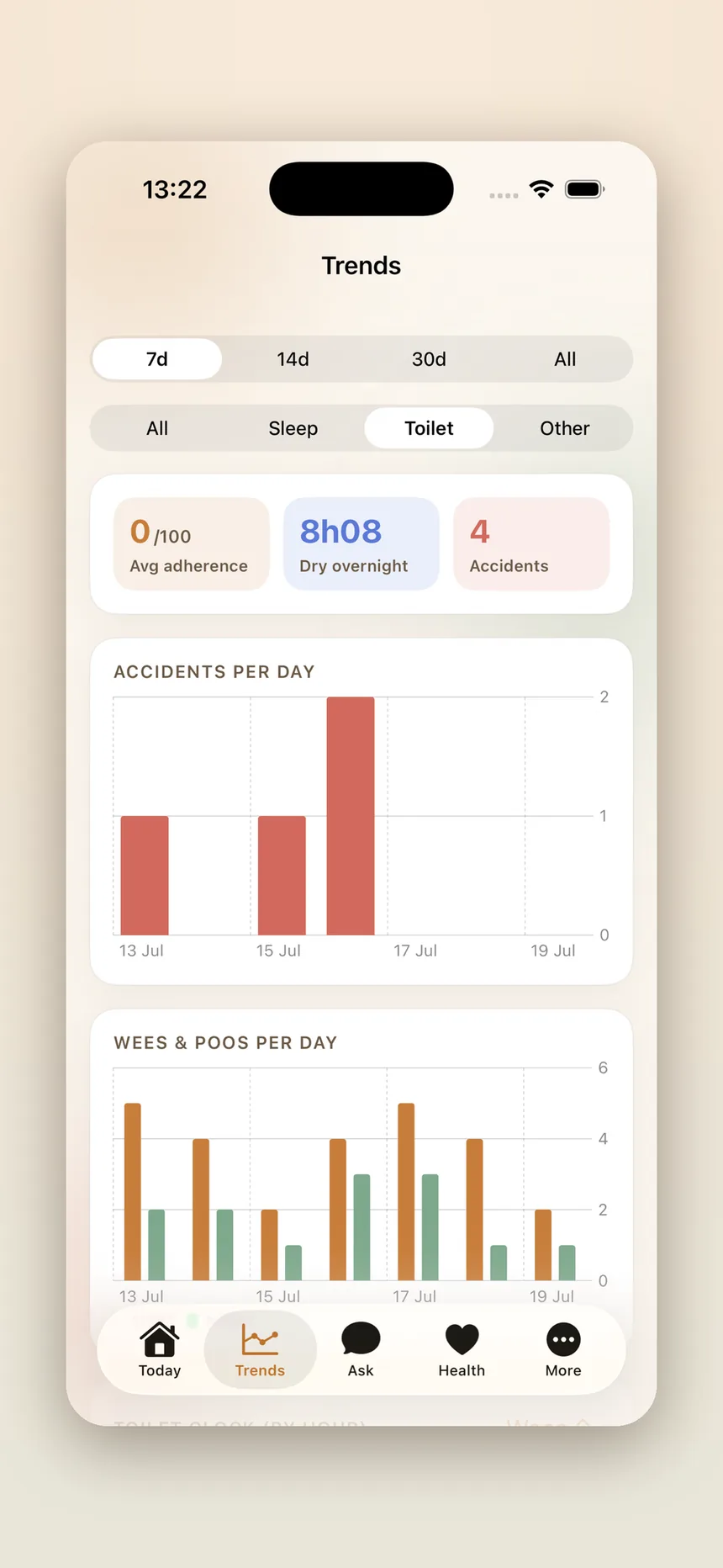
Trends
Watch the progress add up
Accidents, potty timing and sleep — charted across 7, 14 and 30 days.
- Accidents per day, trending down as the routine sticks
- Wees and poos per day, plus toilet timing by hour
- Dry overnight streaks and average adherence
Ask
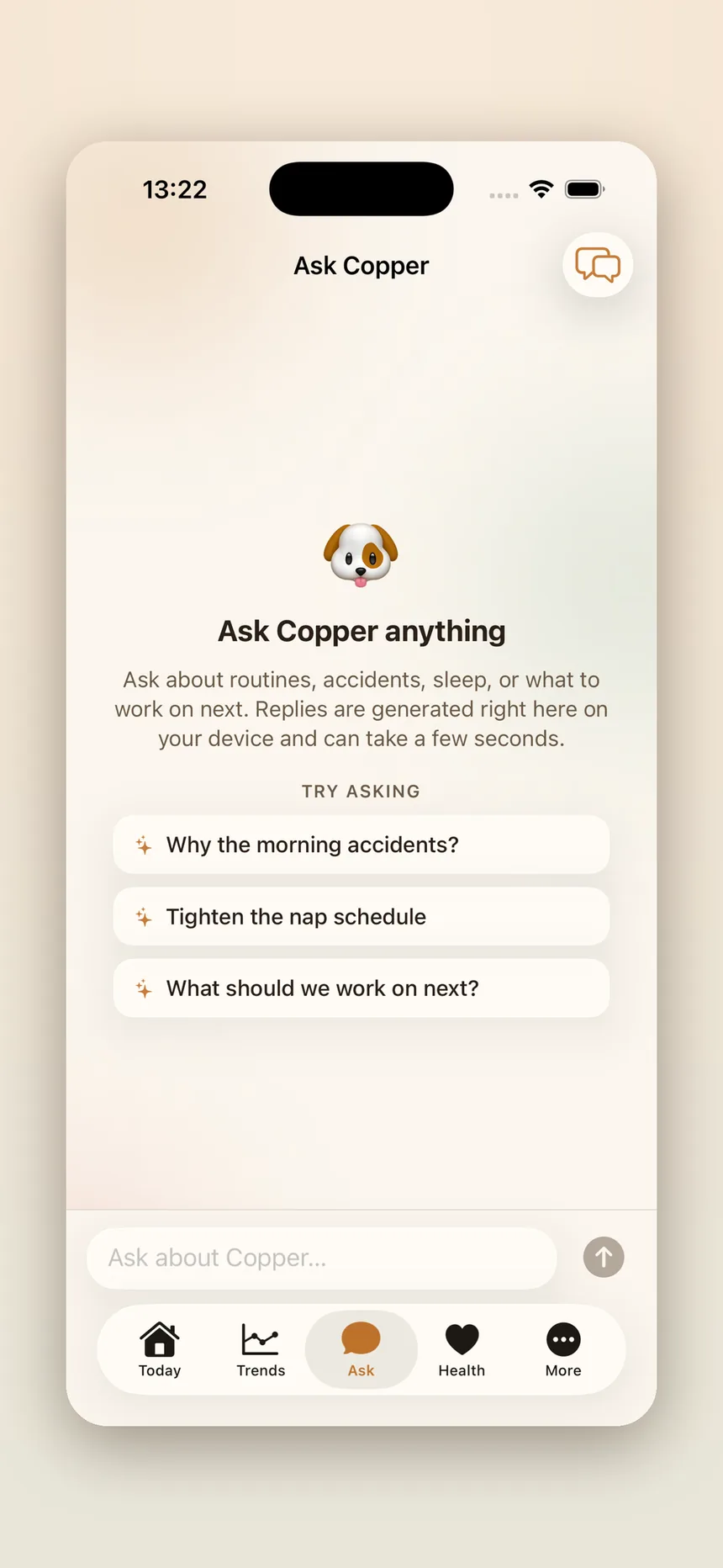
Ask anything, privately
Private, on-device AI answers your questions on routines, sleep and accidents.
- Ask why the morning accidents keep happening
- Get a straight answer on what to work on next
- Grounded in your own logged data, generated on your device
Also in the app
And more...
Health
Weight and growth charts, plus vaccinations, worming and vet visits with due and overdue dates.
Social
Track socialisation and training coverage so nothing important gets missed in the critical window.
The daily story
Each day is written up into a short, readable story you can look back on — generated on your device.
The Grid
A calendar of every day you've logged, so you can see the routine forming week by week.
Widgets & Live Activities
Home-screen widgets for the day so far, and a Live Activity that tracks a nap while it happens.
Siri & Control Centre
Log a wee without unlocking your phone, using Shortcuts and Control Centre controls.
Toilet reminders
Optional nudges when your pup is due a trip outside, scheduled and delivered on-device.
Export & delete
Take your data out as CSV or a single database file at any time — or wipe all of it in one tap.
Private by design
Your puppy's data stays your business.
This isn't a setting you have to go and find. It's how the app is built.
No account, ever
No sign-up, no email, no password. Open the app and start logging.
Stays on your device
Your puppy's log lives in a database on your iPhone or iPad, not in our cloud.
On-device AI
Ask and the daily story run on Apple's on-device models. Nothing is sent away to be read.
Nothing watching you
No analytics, no crash trackers, no advertising SDKs, no third-party code at all.
The full detail — including the optional self-hosted mode and what Apple sees when you leave a tip — is in the privacy policy.
Support the app
Free forever. Tips entirely optional.
PuppyTracker is completely free. Every feature is unlocked for everyone, always — there's no paid tier, no subscription, no ads and nothing locked away behind a paywall.
If the app has helped you and your pup and you'd like to chip in, there's a tip jar inside the app under More → Support PuppyTracker. Every tip goes through the App Store, so there's nothing to sign up for, no card details to hand over to me, and I never see how you paid.
Tips don't unlock anything. They just help keep PuppyTracker going.
Puppy treat
A little thank-you
Favourite toy
Really appreciated
Puppy feast
Above and beyond
Three sizes, priced in your own currency and shown in the app. Tips are processed securely by the App Store and are entirely optional — PuppyTracker is, and always will be, free.
FAQ
Questions?
Is PuppyTracker free?
Yes, completely. Every feature — tracking, trends, health, the daily story, the on-device AI — is unlocked for everyone. There's no paid tier, no subscription and no ads. If the app has helped you, there's an optional tip jar inside it, but tipping unlocks nothing.
Do I need an account?
No. There's no sign-up, no email address and no password. Tell the app your puppy's name and start logging.
Where is my puppy's data stored?
In a database on your own device, along with any photo you add. It's included in your normal encrypted iPhone or iPad backups. There's no cloud account, no analytics and no third-party SDKs, so there's nowhere else for it to go.
Does the AI send my data to a server?
No. The Ask tab and the daily story use Apple's on-device Foundation Models, so replies are generated right on your iPhone or iPad. Your puppy's data is never sent to us or to any AI provider — there's no cloud fallback by design.
Which devices does it need?
iPhone or iPad running iOS 26 or later. The Ask tab and the daily story depend on Apple's on-device AI, so on hardware that can't run those models the rest of the app still works and those two features are simply hidden.
Can my partner and I share the same log?
Not by default — because everything stays on your device, there's no account to share and no sync between phones. If you do want a shared log, Settings → Data & backup has an advanced option to point the app at your own self-hosted PuppyTracker server, and both devices then read and write the same data. Most people never need it.
Can I get my data out, or delete it?
Both, from Settings → Data & backup. Export your events, weights, health records and treatment history as CSV, or the whole database as a single file. The same screen can permanently wipe everything from your device.
Will it send me notifications?
Only if you ask it to. Toilet reminders are opt-in and are scheduled and delivered entirely on your device. There are no marketing notifications.
Is there an Android version?
Not at the moment. PuppyTracker is built natively for iOS and leans on Apple's on-device AI for the parts that make it feel smart, so there's no Android version planned yet.
Something's broken. How do I get help?
Email me and I'll reply personally — there's no ticket system and no support bot. Details are in the contact section just below.
Support
Something wrong? Email me.
PuppyTracker is made by one person, and support goes straight to my inbox — no ticket numbers, no chatbot.
Get in touch
Bug reports, feature ideas, questions about your pup's routine, or a note to say the app helped — all welcome. I aim to reply within a couple of days.
What helps me help you
There's no account behind the app, so I can't look up your data — I only know what you tell me.
- What happened, and what you expected instead
- Your iPhone or iPad model and iOS version
- A screenshot, if there's something odd on screen
Bring home the chaos.
We'll help you make sense of it — one tap at a time, entirely on your own phone.
Free · iPhone & iPad · iOS 26 or later